
A4 Size in Pixels
A4 is 210 x 297 mm (8.27 x 11.69 in). At 300 DPI that's 2480 x 3508 pixels; at 96 DPI (web) it's 794 x 1123 pixels. Pick any DPI and orientation below.
- 72 DPI · screens595 x 842pixels
- 96 DPI · web794 x 1123pixels
- 150 DPI · drafts1240 x 1754pixels
- 300 DPI · print2480 x 3508pixels
What is the A4 Size in Pixels Converter?
It turns an A4 sheet, 210 x 297 mm, into a width and height in pixels for the DPI you choose. You enter the DPI and the orientation, and it gives you the pixel size to use for a canvas, an image or an export.
Why A4 has more than one size in pixels
You're setting up an A4 flyer in Photoshop, Canva or GIMP, and the new-file box wants a width and height in pixels. Look it up and you'll find 595 x 842, 794 x 1123 and 2480 x 3508, all for the same sheet of paper.
All three are right. A4 is a physical size, so its size in pixels depends on how many pixels go into each inch: the DPI. 794 x 1123 is A4 at 96 DPI, the size of an A4 page on screen. 2480 x 3508 is the same page at 300 DPI, enough pixels to print it sharply. Decide where the file is going first, and the pixel size follows.
The converter does the arithmetic. It doesn't choose the DPI for you, and it only adds the bleed a print shop may ask for when you tick Add bleed for print (see the example below). If the file is for a printer or office in the US, you may need US Letter size in pixels instead.
How to use the converter
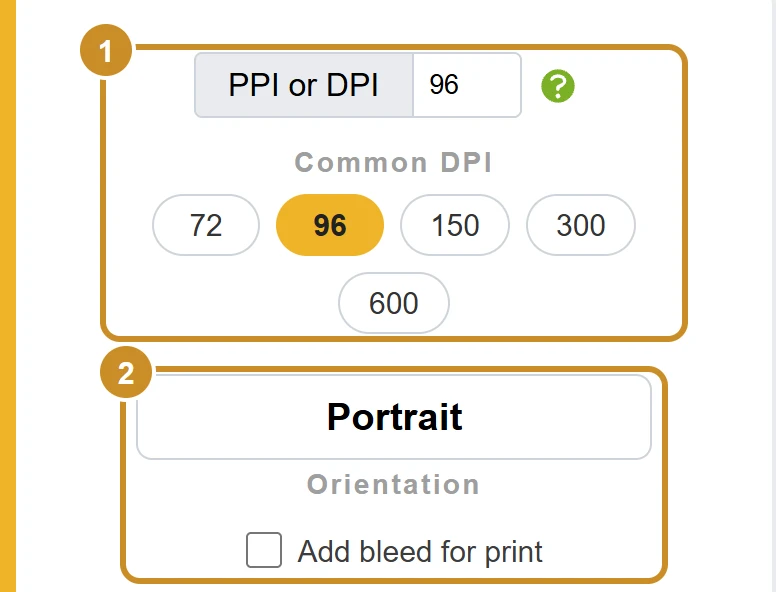
- Step 1: Set the DPI. Tap one of the Common DPI buttons (72, 96, 150, 300 or 600), or type any value into PPI or DPI.
- Step 2: Choose Portrait or Landscape under Orientation. Landscape swaps the width and height. If your printer asks for bleed, tick Add bleed for print and enter the amount per side.
- Step 3: Read WIDTH in Pixels and HEIGHT in Pixels. They update as soon as you change anything, and the copy button puts the size on your clipboard. The outline under the results shows the page's shape. The next section explains them.
Your results, explained
The image shows the values the converter starts with: 96 DPI, portrait.
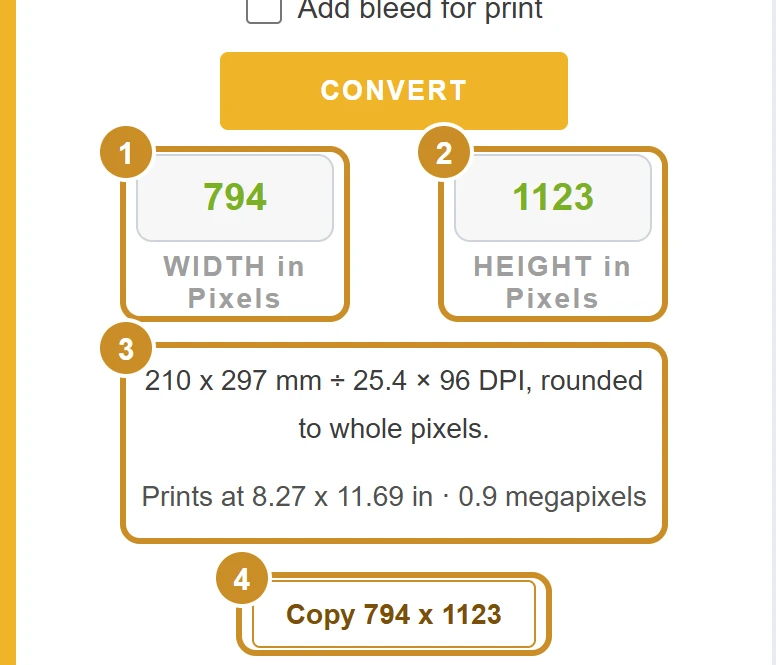
1. WIDTH in Pixels: 794
A4 is 210 mm wide, and 210 ÷ 25.4 × 96 = 793.70, rounded to 794. Use this as the width of your canvas, image or export at 96 DPI.
2. HEIGHT in Pixels: 1123
The 297 mm height gives 297 ÷ 25.4 × 96 = 1122.52, rounded to 1123. Together, 794 x 1123 is A4 at 96 DPI. For a print file, choose 300 DPI to get 2480 x 3508.
3. The lines under the results
It shows how the two numbers were worked out: the size in millimeters, divided by 25.4 to get inches, times your DPI, rounded to whole pixels. If you choose Landscape, it also says that width and height are swapped. The second line gives the printed size in inches and the image size in megapixels (8.27 x 11.69 in · 0.9 megapixels here).
4. Copy 794 x 1123
Copies the size as text, 794 x 1123, so you can paste it into Photoshop, Canva or a message. The button says Copied! for a moment so you know it worked, and its label follows whatever DPI and orientation you choose.
Example: an A4 flyer for print
Say you're designing a one-page A4 flyer for a print shop (an illustrative example). For print, 300 DPI is the usual choice, so pick 300 DPI and keep Portrait.
Width: 210 ÷ 25.4 × 300 = 2480.31, rounded to 2480
Height: 297 ÷ 25.4 × 300 = 3507.87, rounded to 3508
Canvas: 2480 x 3508 pixels
Check it back: 2480 ÷ 300 × 25.4 = 209.97 mm, and 3508 ÷ 300 × 25.4 = 297.01 mm. The tiny gap from 210 x 297 mm comes from rounding to whole pixels, far less than a printer can show.
If the flyer's background or photo runs to the edge of the paper, the print shop may ask for bleed: extra artwork around the edge that gets trimmed off. With 3 mm on every side, the artwork becomes 216 x 303 mm:
Width: 216 ÷ 25.4 × 300 = 2551.18, rounded to 2551
Height: 303 ÷ 25.4 × 300 = 3578.74, rounded to 3579
Canvas with bleed: 2551 x 3579 pixels
The converter gives the same answer: pick 300, tick Add bleed for print and enter 3 mm.
So set the canvas to 2551 x 3579, keep text and logos well inside the 2480 x 3508 page area, and export at 300 DPI. The 3 mm here is only an example; use the bleed your printer gives you.
How the converter works out the pixels
DPI means dots per inch, and on screen a dot is a pixel. So the converter turns A4 into inches and multiplies by your DPI.
inches = millimeters ÷ 25.4
pixels = inches × DPI
Each side is rounded to the nearest whole pixel (exactly .5 rounds up).
Landscape: width and height swap.
One inch is 25.4 mm, and CSS defines 1 inch as 96 pixels, which is why 96 DPI gives the on-screen size. A4 is defined in millimeters, so it never comes out as a whole number of inches. The converter keeps the full value until the end and rounds once, which is why its answers can differ by a pixel from tools that round the inches first.
Source: W3C CSS Values and Units, absolute lengths (1in = 2.54cm = 96px), checked 21 November 2026.
A4 in pixels at common DPI, and what each is for
Choose by where the file will end up. On a screen only the pixels count; the DPI matters when you print. The two rows most people need, 96 DPI for screens and 300 DPI for print, are highlighted. Landscape is the same page turned sideways, so the width and height swap. Tap a row to load its DPI into the converter.
| DPI | Portrait (Width x Height) | Landscape (Width x Height) | Good for |
|---|---|---|---|
| 595 x 842 px | 842 x 595 px | Screens and web graphics | |
| 794 x 1123 px | 1123 x 794 px | Web pages and slides (CSS size) | |
| 1240 x 1754 px | 1754 x 1240 px | Drafts and office printing | |
| 1654 x 2339 px | 2339 x 1654 px | Office print with finer detail | |
| 2480 x 3508 px | 3508 x 2480 px | Professional print and photos | |
| 4961 x 7016 px | 7016 x 4961 px | Line art and very fine text |
A4 dimensions in mm, cm and inches
A4 is defined in millimeters by the ISO 216 standard. Centimeters are exact; inches are rounded to 2 decimals.
| Unit | Width x Height |
|---|---|
| Millimeters | 210 x 297 mm |
| Centimeters | 21 x 29.7 cm |
| Inches | 8.27 x 11.69 in |
Before you create the file
Most A4 problems come from one of these:
Changing only the DPI number
A 794 x 1123 image set to 300 DPI prints at about 2.6 x 3.7 in, not A4. Create the file at 2480 x 3508 pixels instead.
Using A4 for US printing
US Letter is wider and shorter, so an A4 file printed on Letter paper gets scaled down or cut off. Check which paper the printer uses.
Forgetting bleed
Artwork that should reach the edge needs the extra bleed area your printer asks for.
Exporting at a different size
Some export settings resize the image, so check the exported file is still the size you set.
Quick checklist
- Decide: screen (96 DPI) or print (300 DPI).
- Confirm A4 or US Letter with whoever prints it.
- Ask the printer for their bleed and safe margin.
- Create the canvas at the full pixel size.
- Check the pixel size of the exported file.
Frequently asked questions
What is A4 size in pixels at 300 DPI?
2480 x 3508 pixels in portrait and 3508 x 2480 pixels in landscape. That's the usual size for a print file.
What is A4 size in pixels for web?
794 x 1123 pixels. That uses 96 pixels per inch, the value CSS uses for screens. At 72 DPI it's 595 x 842 pixels.
How many pixels is A4 at 150 DPI?
1240 x 1754 pixels in portrait and 1754 x 1240 in landscape. 150 DPI is fine for drafts and office printing.
Is A4 the same as US Letter?
No. A4 is 210 x 297 mm (8.27 x 11.69 in) and US Letter is 8.5 x 11 in (215.9 x 279.4 mm), so A4 is narrower and taller. At 300 DPI that's 2480 x 3508 pixels for A4 and 2550 x 3300 for US Letter.
Why is A4 794 x 1123 pixels and not a decimal size?
Pixels only come in whole numbers. At 96 DPI the exact size is 793.70 x 1122.52 pixels, so the converter rounds each side to the nearest pixel. The difference is less than 0.13 mm.
Does the DPI change how big A4 looks on screen?
No. A screen shows pixels, so a 2480 x 3508 pixel image looks the same on screen whatever DPI is saved in the file. The DPI only tells a printer or app how large to print those pixels.
What is A4 with bleed in pixels?
With 3 mm of bleed on every side, A4 becomes 216 x 303 mm, which is 2551 x 3579 pixels at 300 DPI. Printers set their own bleed, so check their file spec first.